Odyz FAQ
How do I see which cities I've visited?
Odyz › FAQ › Which cities have I visited?
Published · Updated
The short answer
Your Odyz timeline lists every trip with the cities you visited and photos from each one, and your map puts a pin on every place you've been. Your passport counts your cities, and you can open any trip to see its photos on the map, or take a 3D city tour. Odyz covers every city in the world, and it all builds itself from your photos.
Step by step
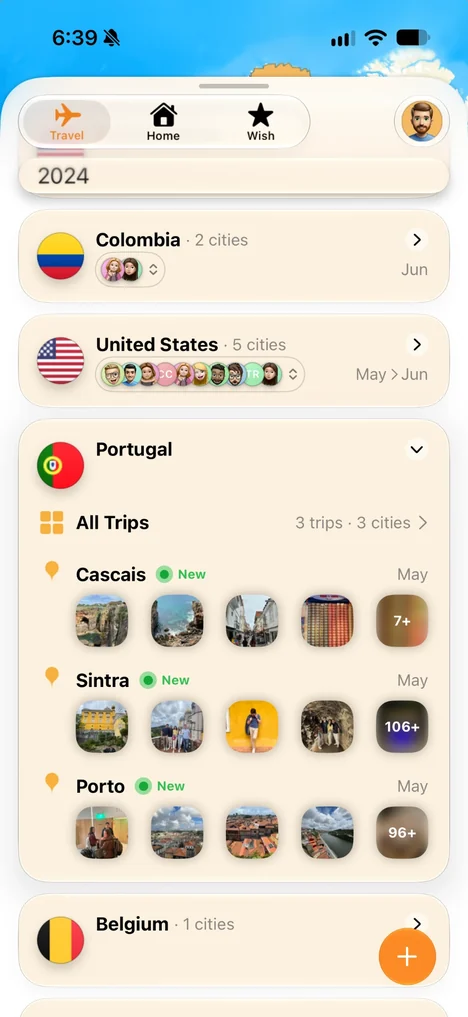
Check your timeline
Every trip lists the cities you visited, with photos from each one. Open a country to see all of your trips and cities there.
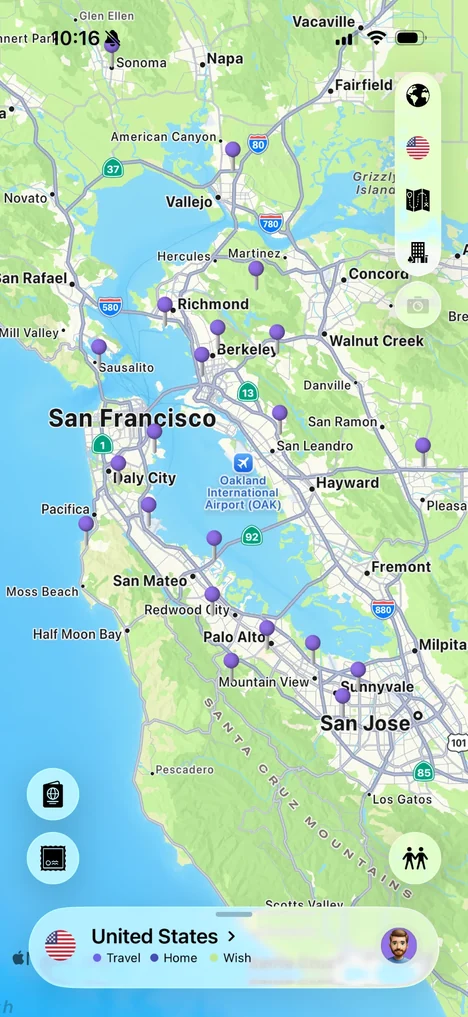
Look at your map
Your map puts a pin on every place you've been, so you can zoom into a region and see every town and neighborhood you've visited.
Tour a city in 3D
Open a city to see your photos on a 3D map, right where you took them, inside landmarks or out on the street.

See every city at once
Tap the passport icon and flip to the Footsteps page: a dot on the world map for every city you've ever visited, with the total underneath.

Frequently asked questions
Does Odyz track every city?
Yes. Odyz covers every city in the world, in all 193 UN countries and many more territories.
How many cities have I visited?
Tap the passport icon on the main screen: the number of cities is on the first page, and the Footsteps page shows each one as a dot on the map. Pick a year to count just that year.
How does Odyz know which city a photo was taken in?
From the location saved in the photo. Odyz reads it on your device and matches it to the city and country.
Can I see the cities I visited in one country?
Yes. Your timeline groups trips by country, with the cities you visited and photos from each.
More questions
Try it with your own photos
Odyz is free on iPhone and iPad, with no ads and no account. Your travel history is ready the first time you open it.